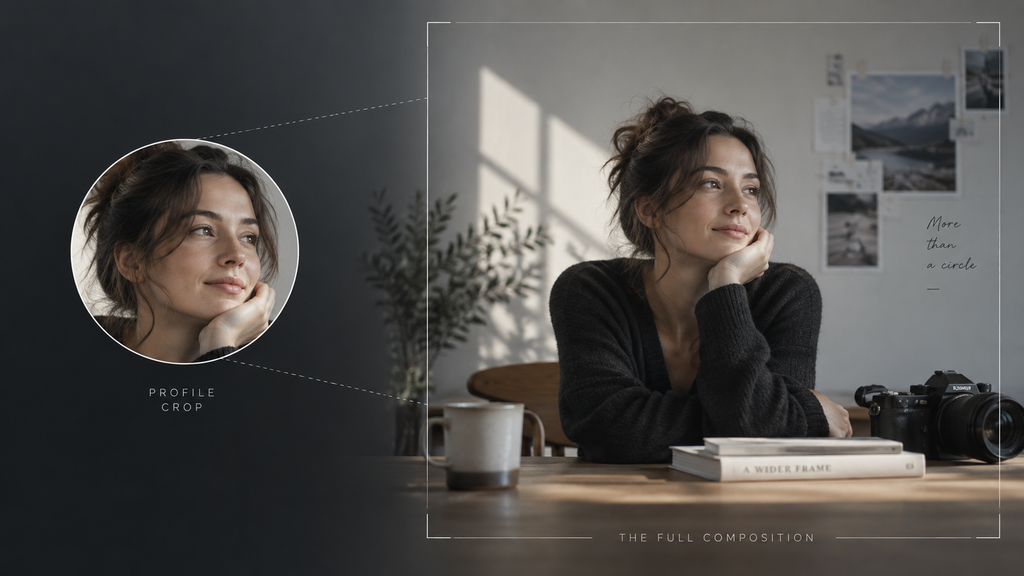
Photographers spend hours framing a shot for a gallery wall, a magazine spread, a print that’ll actually be seen at full size. Then the same person uploads a profile photo to Instagram, where it gets crammed into a circle roughly the size of a fingertip. It’s one of the most-viewed photo formats in the world, and almost nobody composes for it on purpose, or thinks to check what an IG profile photo viewer would actually reveal about the image once the crop is stripped away.
The Circle Problem
Instagram displays profile photos as circles, which means anything near the corners of a square upload gets clipped off entirely. A carefully composed rule-of-thirds shot, with the subject deliberately placed off-center, can lose exactly the part that made the composition work in the first place. A photo that reads perfectly well as a square often reads completely differently once the corners disappear, sometimes losing an entire secondary subject or a piece of context that gave the original frame its meaning.
This is the actual, practical reason interest in something like an IG profile photo viewer exists at all. Seeing the photo the way it was actually composed, as a full square or rectangle rather than a cropped circle, restores context the platform strips away by default. For anyone who’s ever wondered why a photo they loved in full size felt oddly flat as a profile picture, this circular crop is almost always the answer.
What Actually Makes a Profile Photo Work
Good profile photos share a few traits that have nothing to do with expensive equipment and everything to do with composition choices made before the crop ever happens.
Centered subjects survive the crop. Since the circle clips the edges uniformly, anything placed dead center in the original square almost always makes it through intact. This is part of why so many strong profile photos look almost boringly centered when viewed as a full square, that centering is doing real, intentional work. Compare it side by side through an IG profile photo viewer and the logic becomes obvious immediately.
Simple backgrounds hold up better at small size. A profile photo gets viewed tiny most of the time, so a background with too much visual noise turns to mush at that scale. A clean, uncomplicated backdrop reads clearly even shrunk down to icon size.
Strong contrast matters more than fine detail. Subtle tonal gradations that look beautiful in a full-size print disappear entirely in a thumbnail. Photos that rely on clear contrast between subject and background tend to survive the journey from full composition to tiny circle far better than ones relying on delicate shading.
Faces need to be large in frame. A face that’s a small part of a wider environmental portrait reads as an unrecognizable blur at profile photo size. Cropping in tighter than feels natural for a standalone print often produces a better result once it’s shrunk down to how Instagram actually displays it, even if that tighter crop would feel claustrophobic in any other context.
Why Seeing the Original Composition Matters
For anyone studying photography, seeing a profile photo the way it was actually composed, not the circle-cropped version Instagram serves up, is genuinely useful. An IG profile photo viewer, used for this purpose, shows the full square or rectangle the photographer actually framed, corners included, which is often a meaningfully different image than the one everyone sees by default. It’s a small habit, but one that changes how you read other people’s work entirely.
This matters especially when studying the work of photographers who clearly composed with intention. Looking at only the circular crop hides half the story, sometimes literally half the frame, and misses whatever compositional choice actually made the shot work in its original form. A portrait that reads as slightly odd or off-balance in its cropped circle might reveal, once seen in full, a deliberate negative-space choice that only makes sense at the original aspect ratio.
The Small-Screen Reality Every Photographer Should Design For
Most profile photos get viewed at a size smaller than a thumbnail on a contact sheet, often just a few dozen pixels wide in a comment thread or a Stories bar. That’s an unusual constraint compared to almost any other photographic context, and it rewards different choices than a full-size print would. Few photographers would ever design a gallery print around being viewed at the size of a postage stamp, yet that’s effectively the brief every profile photo is working under.
A photo that would win points in a critique for subtlety and negative space often performs worse as a profile photo than something bolder and simpler. This isn’t a knock on subtlety as a photographic value, it’s just a mismatch between that value and the format the photo is actually going to live in most of the time.
Photographers who understand this constraint tend to shoot or select profile photos differently than their other work, prioritizing a strong central subject and high contrast over the more nuanced choices they’d make for a print or a gallery piece. Reviewing a photo through an IG profile photo viewer at its full, uncropped size is a useful step in that selection process, since it shows exactly what’s being lost or gained once the circular crop gets applied. It turns an abstract compositional decision into something you can actually see and compare before committing to it.
A Simple Exercise Worth Trying
Take any profile photo, yours or someone else’s, and look at it two ways: as Instagram displays it, cropped into the circle, and as it was actually composed, full frame. The difference is often more dramatic than expected. Details near the edges disappear. Compositional balance that worked in the square version can feel lopsided once a chunk of it vanishes.
Doing this exercise across a handful of photos, using an IG profile photo viewer or any method that surfaces the full uncropped version, tends to sharpen an eye for which compositional choices actually hold up under Instagram’s specific constraints versus which ones only work in the uncropped original. It’s a genuinely useful habit for anyone who photographs people regularly, since profile photos are one of the few formats where the audience only ever sees a fraction of what was actually captured.
The Takeaway for Anyone Choosing Their Own Profile Photo
Center the subject. Keep the background simple. Favor contrast over subtlety. And before committing to a photo, look at it both ways, cropped and uncropped, since the two versions can tell surprisingly different stories about the same image. An IG profile photo viewer is a small, practical tool for that last step, letting the actual composition be judged on its own terms rather than through whatever the circle happens to preserve.
Profile photos rarely get treated as a serious photographic format, mostly because they’re small and function more like an icon than an image. But the compositional discipline they demand, working within a brutal, unforgiving crop while still reading clearly at a tiny size, is its own kind of craft, even if almost nobody thinks of it that way while scrolling past one. The next time you’re choosing between two candidate shots for a profile photo, pulling up an IG profile photo viewer to compare their full, uncropped compositions side by side takes about thirty seconds and often makes the choice obvious in a way that guessing never quite does.
Frequently Asked Questions
Why does Instagram crop profile photos into a circle instead of keeping them square? It’s largely a design consistency choice across the platform, circles create a uniform visual rhythm across feeds, comment sections, and Stories bars. The tradeoff is that any composition relying on the corners of the original frame gets partially lost.
Does the circular crop affect every photo the same way? No. Centered, high-contrast compositions tend to survive the crop with minimal loss. Off-center or edge-reliant compositions lose the most, sometimes losing the entire element that made the shot work.
Is there a way to upload a photo that avoids the crop entirely? Not directly. Instagram applies the circular crop uniformly to all profile photos regardless of format. The only real control a photographer has is composing with that constraint in mind before uploading.
Can an IG profile photo viewer show a higher resolution version, not just an uncropped one? Sometimes, depending on the specific tool and what resolution the account originally uploaded. Removing the circular crop and increasing resolution are two separate things, and not every method that does one also does the other.
Does this apply to Stories previews and other circular elements too? Yes, the same cropping logic applies anywhere Instagram displays a profile photo in a circular frame, not just on the main profile page. The composition considerations are identical regardless of where the circle shows up.